Google Nano Banana 2.1 Edit is the latest Nano Banana image editing model, with gains in visual design, subject consistency and prompt adherence, up to 14 reference images and 1K to 4K output. Ready-to-use REST inference API, best performance, no coldstarts, affordable pricing.
Idle

$0.036per run·~27 / $1
ExamplesView all

Transform only the desk lamp into an elegant biomechanical flower lamp with layered metallic petals, articulated brass joints, translucent ivory panels, and a warm glowing core. Keep approximately the same height and footprint as the original lamp. The woman is writing with a black pen. Preserve the woman, desk, sketchbook, pose, camera angle, and room.

Change her outfit to a tailored navy blazer over a white shirt and move her to a bright modern office lobby. Keep her face, hair and pose unchanged.
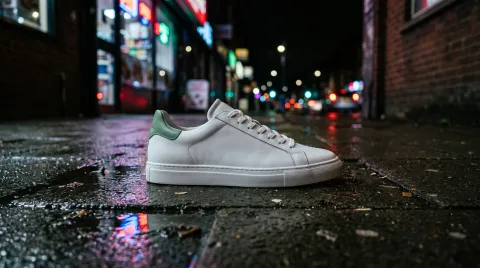
Place this exact sneaker on a wet city sidewalk at night, neon shop signs reflected in the puddles, shallow depth of field, cinematic product shot. Keep the shoe design, colors and proportions unchanged.

Furnish this empty room in Scandinavian style: a beige linen sofa, a light oak coffee table, a wool rug, a floor lamp and a few potted plants. Keep the walls, windows, floor and lighting unchanged.

Turn this into a snowy winter evening: snow on the rooftops and cobblestones, warm light glowing from the windows, gentle snowfall. Keep the buildings and composition the same.
Related Models





README
Google Nano Banana 2.1 Edit
Nano Banana 2.1 Edit is Google's latest Nano Banana AI image editing model. Google reports that it outperforms its previous image models across the board, with notable leaps in visual design and subject consistency, tighter prompt adherence and cleaner text rendering — so edits keep people and products recognizable.
Why Choose This?
-
Google's newest Nano Banana Upgraded over Nano Banana 2 in visual design, subject consistency and prompt adherence.
-
Natural language editing Modify images using simple text instructions — the model understands context and relationships.
-
Multi-image reference Upload up to 14 reference images for complex edits and compositions.
-
Multi-resolution support Output in 1K, 2K, or 4K resolution based on your needs.
-
Flexible aspect ratios Fourteen options: 1:1, 3:2, 2:3, 3:4, 4:3, 4:5, 5:4, 9:16, 16:9, 21:9, 1:4, 4:1, 1:8, 8:1.
-
Format choice Export in PNG or JPEG format.
Parameters
| Parameter | Required | Description |
|---|---|---|
| images | Yes | Reference images to edit (max: 14, click "+ Add Item" to add more) |
| prompt | Yes | Text description of the desired edit |
| aspect_ratio | No | Aspect ratio: 1:1, 3:2, 2:3, 3:4, 4:3, 4:5, 5:4, 9:16, 16:9, 21:9, 1:4, 4:1, 1:8, 8:1 |
| resolution | No | Output resolution: 1k (default), 2k, 4k |
| enable_web_search | No | Enable web search to enhance generation with real-time info (default: false) |
| enable_image_search | No | Enable image search to ground the generation in real reference images (default: false) |
| output_format | No | Output format: png (default), jpeg |
How to Use
- Upload reference images — add the images you want to edit (up to 14 images).
- Write your prompt — describe the change, then what must stay the same.
- Choose aspect ratio (optional) — select a preset or leave empty to follow the input.
- Select resolution — choose 1K, 2K, or 4K based on your needs.
- Choose output format — PNG or JPEG.
- Run — submit and download your edited image.
Pricing
The price depends on the output resolution, the number of reference images, and whether web search or image search is on.
| Item | Cost |
|---|---|
| 1k output resolution (before reference images and search) | |
| 2k output resolution (before reference images and search) | |
| 4k output resolution (before reference images and search) | |
| Web search on (added) | + |
| Image search on (added) | + |
| Each reference image (added) | + |
Example Costs
| Output resolution | Number of reference images | Cost |
|---|---|---|
| 1k | 1 reference image | |
| 1k | 4 reference images | |
| 2k | 1 reference image | |
| 2k | 14 reference images | |
| 4k | 1 reference image |
Best Use Cases
- Character Modification — Change clothing, setting, or style while keeping identity.
- Product Placement — Put a product into new scenes while keeping it accurate.
- Multi-reference Composition — Combine subjects, outfits and styles from several images.
- Text Editing — Modify or translate on-image text while keeping the design.
- Scene Adjustment — Change backgrounds, lighting, or environmental elements.
Pro Tips
- State the edit first, then what to keep: "replace the background with a beach at dusk, keep the person and lighting unchanged".
- Put the main subject first and refer to other references by position ("the jacket from image 2").
- Fewer reference images (1–3) give the most stable results for simple edits.
Notes
- Both images and prompt are required fields.
- Maximum reference images: 14.
- Each reference image adds
$0.002$0.0018 to the cost. - Ensure your prompts comply with Google's Safety Guidelines.
Related Models
- Nano Banana 2.1 Text-to-Image — Generate images from text prompts.
- Nano Banana 2 Edit — Previous generation with a 0.5K option and Fast variants.
- Nano Banana Pro Edit — Pro tier editing.
Nano Banana 2.1 Edit API — Quick start
Grab a WaveSpeedAI API key, then call POST https://api.wavespeed.ai/api/v3/google/nano-banana-2.1/edit with your input as JSON. The endpoint returns a prediction id. Start polling the result endpoint around every 2 seconds, increase the interval for long-running tasks, and stop on any terminal status. On completed, read output values from data.outputs. Examples for Nano Banana 2.1 Edit below.
HTTP example
set -euo pipefail

: "${WAVESPEED_API_KEY:?Set WAVESPEED_API_KEY}"

REQUEST_BODY=$(cat <<'JSON'
{
    "prompt": "A cinematic shot of a city at sunset, soft golden light",
    "images": [
        "https://interactive-examples.mdn.mozilla.net/media/cc0-images/painted-hand-298-332.jpg"
    ],
    "aspect_ratio": "1:1",
    "resolution": "1k",
    "enable_web_search": false,
    "enable_image_search": false,
    "output_format": "png"
}
JSON
)

# 1. Submit the prediction.
SUBMIT_RESPONSE=$(curl --silent --show-error --fail-with-body \
  -X POST "https://api.wavespeed.ai/api/v3/google/nano-banana-2.1/edit" \
  -H "Content-Type: application/json" \
  -H "Authorization: Bearer $WAVESPEED_API_KEY" \
  -d "$REQUEST_BODY")

TASK=$(printf '%s' "$SUBMIT_RESPONSE" | jq 'if has("data") then .data else . end')
PREDICTION_ID=$(printf '%s' "$TASK" | jq -r '.id')
if [ -z "$PREDICTION_ID" ] || [ "$PREDICTION_ID" = "null" ]; then
  printf 'Submission response did not contain a prediction id
' >&2
  exit 1
fi
RESULT_URL="https://api.wavespeed.ai/api/v3/predictions/$PREDICTION_ID/result"

# 2. Poll until the prediction finishes.
while true; do
  RESPONSE=$(curl --silent --show-error --fail-with-body "$RESULT_URL" \
    -H "Authorization: Bearer $WAVESPEED_API_KEY")
  RESULT=$(printf '%s' "$RESPONSE" | jq 'if has("data") then .data else . end')
  STATUS=$(printf '%s' "$RESULT" | jq -r '.status')
  case "$STATUS" in
    completed) printf '%s\n' "$RESULT" | jq '.outputs'; break ;;
    failed|cancelled|timeout|deleted) printf '%s\n' "$RESULT" | jq . >&2; exit 1 ;;
    *) sleep 2 ;;
  esac
done
Node.js example
const submitUrl = "https://api.wavespeed.ai/api/v3/google/nano-banana-2.1/edit";
const apiKey = process.env.WAVESPEED_API_KEY;
if (!apiKey) throw new Error('Set WAVESPEED_API_KEY');

async function requestJson(url, options = {}) {
  const response = await fetch(url, options);
  if (!response.ok) throw new Error(await response.text());
  return response.json();
}

// 1. Submit the prediction.
const body = await requestJson(submitUrl, {
  method: "POST",
  headers: {
    "Authorization": `Bearer ${apiKey}`,
    "Content-Type": "application/json",
  },
  body: JSON.stringify({
        "prompt": "A cinematic shot of a city at sunset, soft golden light",
        "images": [
                "https://interactive-examples.mdn.mozilla.net/media/cc0-images/painted-hand-298-332.jpg"
        ],
        "aspect_ratio": "1:1",
        "resolution": "1k",
        "enable_web_search": false,
        "enable_image_search": false,
        "output_format": "png"
}),
});
const task = body.data ?? body;
if (!task.id) throw new Error("Submission response did not contain a prediction id");
const resultUrl = `https://api.wavespeed.ai/api/v3/predictions/${task.id}/result`;

// 2. Poll until the prediction finishes.
while (true) {
  const resultBody = await requestJson(resultUrl, {
    headers: { "Authorization": `Bearer ${apiKey}` },
  });
  const result = resultBody.data ?? resultBody;
  if (result.status === "completed") {
    console.log(result.outputs);
    break;
  }
  if (["failed", "cancelled", "timeout", "deleted"].includes(result.status)) throw new Error(JSON.stringify(result));
  await new Promise(resolve => setTimeout(resolve, 2000));
}
Python example
import json
import os
import time
from urllib.request import Request, urlopen

api_key = os.environ["WAVESPEED_API_KEY"]
headers = {"Authorization": f"Bearer {api_key}", "Content-Type": "application/json"}
payload = {
    "prompt": "A cinematic shot of a city at sunset, soft golden light",
    "images": [
        "https://interactive-examples.mdn.mozilla.net/media/cc0-images/painted-hand-298-332.jpg"
    ],
    "aspect_ratio": "1:1",
    "resolution": "1k",
    "enable_web_search": False,
    "enable_image_search": False,
    "output_format": "png"
}

def request_json(url, data=None):
    request = Request(url, data=data, headers=headers, method="POST" if data else "GET")
    with urlopen(request) as response:
        return json.load(response)

# 1. Submit the prediction.
body = request_json("https://api.wavespeed.ai/api/v3/google/nano-banana-2.1/edit", json.dumps(payload).encode())
task = body.get("data", body)
if not task.get("id"):
    raise RuntimeError("Submission response did not contain a prediction id")
result_url = f"https://api.wavespeed.ai/api/v3/predictions/{task['id']}/result"

# 2. Poll until the prediction finishes.
while True:
    result_body = request_json(result_url)
    result = result_body.get("data", result_body)
    status = result.get("status")
    if status == "completed":
        print(result.get("outputs", []))
        break
    if status in {"failed", "cancelled", "timeout", "deleted"}:
        raise RuntimeError(result)
    time.sleep(2)
Nano Banana 2.1 Edit API — Frequently asked questions
What is the Nano Banana 2.1 Edit API?
Nano Banana 2.1 Edit is a Google model for image editing, exposed as a REST API on WaveSpeedAI. Google Nano Banana 2.1 Edit is the latest Nano Banana image editing model, with gains in visual design, subject consistency and prompt adherence, up to 14 reference images and 1K to 4K output. Ready-to-use REST inference API, best performance, no coldstarts, affordable pricing. You can call it programmatically or try it from the playground above.
How do I call the Nano Banana 2.1 Edit API?
POST your input parameters to the model's REST endpoint (shown in the API tab of this playground) with your WaveSpeedAI API key in the Authorization header. Submission returns a prediction ID. Poll the result endpoint starting around every 2 seconds, increase the interval for long-running tasks, and stop on any terminal status. The playground generates Python, JavaScript, and cURL examples for submitting requests and polling results. Full request/response shape is documented at https://wavespeed.ai/docs/docs-api/google/nano-banana-2.1/edit.
How much does Nano Banana 2.1 Edit cost per run or per second?
Nano Banana 2.1 Edit starts at $0.036 per run or per second. That figure is the base price — the final charge scales with the parameters you set in the form (output size, length, count, references, or whatever knobs this model exposes), so a higher-quality or larger output costs more than a minimal one. The exact cost for your current input is shown live next to the Generate button before you submit, and the actual per-call charge is recorded on the prediction afterwards.
What inputs does Nano Banana 2.1 Edit accept?
Key inputs: `prompt`, `images`, `aspect_ratio`, `resolution`, `enable_image_search`, `enable_web_search`. The full JSON schema (types, defaults, allowed values) is rendered above the Generate button and mirrored in the API reference at https://wavespeed.ai/docs/docs-api/google/nano-banana-2.1/edit.
How long does Nano Banana 2.1 Edit take to generate?
Reported generation time on WaveSpeedAI is around 44 seconds per request. This is an estimate, not a latency guarantee; queue time and input settings can change the total wait. live status is visible in the prediction record.
Can I use Nano Banana 2.1 Edit outputs commercially?
Commercial usage rights depend on the model's license, set by its provider (Google). Check the provider's applicable terms and WaveSpeedAI's Terms of Service before commercial use.
More from Google
View all- google/gemini-2.5-flash-image-preview/editImage Editing
- google/gemini-2.5-flash-image-preview/text-to-imageText to Image
- google/gemini-2.5-flash-image/editImage Editing
- google/gemini-2.5-flash-image/text-to-imageText to Image
- google/gemini-2.5-flash/text-to-speechText to Speech
- google/gemini-2.5-pro/text-to-speechText to Speech
- google/gemini-3-pro-image/editImage Editing
- google/gemini-3-pro-image/text-to-imageText to Image
More Image Editing models
View all- bytedance/seedream-v5.5/editImage Editing
- bytedance/seedream-v5.0-pro/editImage Editing
- google/nano-banana-pro/editImage Editing
- bytedance/seedream-v4.5/editImage Editing
- openai/gpt-image-2.6-sunburst/editImage Editing
- alibaba/wan-2.7/image-editImage Editing
- google/nano-banana-2/editImage Editing
- openai/gpt-image-2/editImage Editing